

|
|
|
This topic addresses how circularity manifests itself and how to avoid virtualizing a field back onto the originating file.
If you can follow the path of relations from a file and end up returning to that file, you have an instance of circularity within the model. This does not necessarily mean that the series of relations is invalid, but that you must check the sequence of relations to ensure that the sequence will allow you to pass the virtual fields that you require. Circularity manifests itself in the disappearance and duplication of virtual fields.
Although the following three relations are acceptable, they can lead to circularity:
A Refers to B, B Owned by A

A Extended by B, B Owned by A

Example: A Refers to A
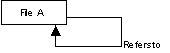
Here is an example of a model containing these relations:
Account details Owned by Customer
Account details Has Account opened date
Customer Known by Customer code
Customer Extended by Account details
Customer Has Customer type
Virtualizing against the Owned by relation would allow you to declare Customer type as a virtual field on the Account details file, and you could declare Account opened date as a virtual field on the Customer file over the Extended by relation. The file entries would now look like this:
Account details Customer code Key
Customer type Virtual
Account opened date Attributes
Customer Customer code Key
Account opened date Virtual
Customer type Attributes
If you then resynchronize the model, the virtual entry Account opened date no longer appears on the Customer file. During resynchronization, the relations are expanded into file entries. When expansion occurs, the Account details file relations will be expanded into entries before the Customer relations.
The expansion of relations would occur in this sequence:
No entries that exist on Account details can be virtual fields on the Customer file, since the relation, Account details Has Account opened date, has not been expanded.
The expansion of Customer has finished, so it returns to Account details.
Expansion ends here. Two further steps are needed:
The model relations would now look like this:
*Force Sequence Refers to Customer
Account details Owned by Customer
Account details Has Account opened date
Customer Known by Customer code
Customer Has Customer type
Customer Extended by 99 Account details
The expansion of relations would happen in this sequence:
The expansion of Account details has finished, so it returns to *Force sequence. No virtuals will have been specified on the *Force sequence Refers to Customer relation. Expansion ends here.
If you find that virtuals have disappeared due to circularity in your model, you will also find that if you try to put them on again they will appear twice in the file entries. If this happens, repeatedly remove the virtuals until they do not appear in the file entries. Follow the steps above before adding them again.
| Copyright © 2011 CA. All rights reserved. | Tell Technical Publications how we can improve this information |