

|
|
|
When a STS field is assigned as a drop-down list, a Window is created in the display file. The window contains a single choice field (SNGCHCFLD radio button selection), where the choices for the control equal the available condition values.
Note: If the number of values attached to a condition changes, you must regenerate the function.
The condition name associated with each condition value appears in the pop-up window. After you select a value, the window closes and the external value for the selected condition is placed in the prompted field.
The drop-down list is positioned on the screen with its top left corner in the first character of the status field. If there is not enough room on the screen, the drop down list moves left and up until it fits on the screen.
Note: The drop-down list can only be prompted using F4 (or equivalent assignment); you cannot prompt with a question mark.
The following is an example of a drop-down list:
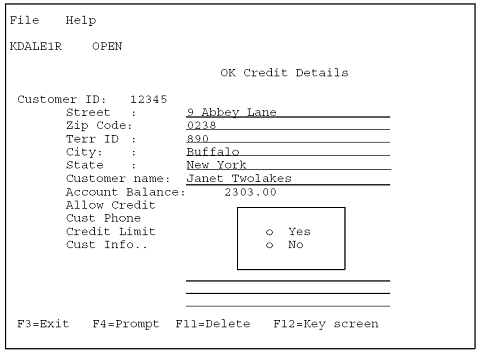
When you prompt Allow Credit with the F4 key, the previous window displays and overlays other fields. When a value is selected, the window is removed.
You can designate a STS (status) field as a drop-down list at the condition level, the field level, and the screen entry level, as in the partial screen examples that follow:
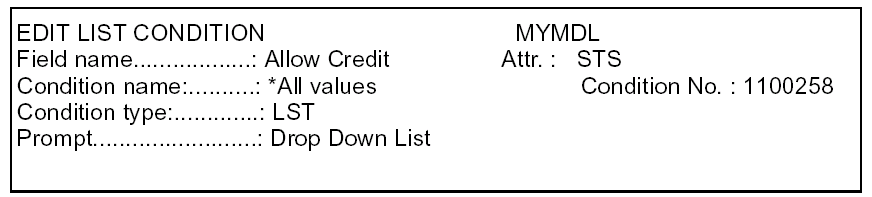
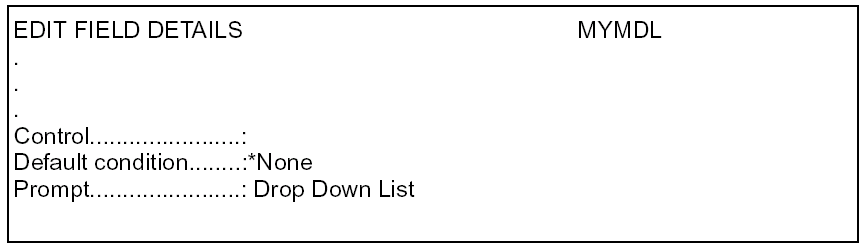
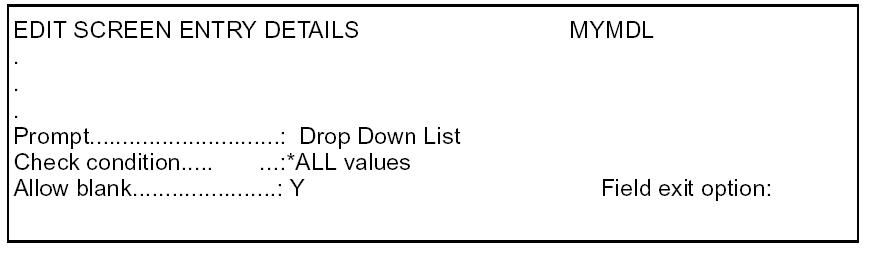
On the Field level, F10 toggles between the field control information and the appearance fields.
To specify,
Note: The Prompt Type field only displays if the field is STS.
The field may be prompted with a ? to get a list of valid values. Valid values for Prompt Type at the Condition, Field or Screen level are:
*Drop Down List (or *DDL)
*Condition Values Displayer (or *CVD) is the
default value
| Copyright © 2011 CA. All rights reserved. | Tell Technical Publications how we can improve this information |