Modifying Device Designs › Editing Report Designs › Automatic Choice of Report Fields
Automatic Choice of Report Fields
Fields within a format are laid out left to right across the page in the order in which they appear in the access path. All fields from the access path are available on all formats but can be hidden or dropped by default.
Fields will, by default, be present or dropped at a given format level according to the following rules:
- Key fields are present on their respective heading and total formats and all lower level formats.
- Non-key fields that are virtual fields are present on a format if all the fields resulting from the resolution of the virtual field’s defining relation are also present on the format. That is, if the necessary key fields to retrieve the virtual field are also present. Any such virtual fields are also present on all lower level formats.
- Key fields that are virtual fields are present together with their associated real fields if the print function is based on a Query access path. That is, the real fields resulting from the resolution of the virtual field’s defining relation. These fields are also present on all lower formats.
- Non-key fields that are neither virtual fields nor fields associated with a virtual key are present only on the detail record.
Fields will, by default, be hidden or shown at a given format level according to the following rules:
- Key fields (including virtual keys) are, by default, hidden except on the respective heading and total formats which they control.
- Non-key fields that are virtual fields are shown on the format containing their controlling key fields, if any. If a virtual field is present on a higher-level format then, by default, it is hidden on the detail level format.
- Non-key fields associated with a virtual key are shown on the format containing their associated virtual keys. They are hidden on the detail format.
- Non-key fields which are neither virtual fields nor fields associated with a virtual key are, by default, shown on the detail format.
|
|
|
|
|
Access Path Entries
|
KHD
|
RCD
|
KTL
|
|
K Key field (real)
|
O
|
H
|
O
|
|
K Key field(Virtual)
|
O
|
H
|
O
|
|
Virtual field
|
O
|
H
|
O
|
|
Fld associated with virtual key
|
O
|
H
|
O
|
|
Detail field
|
–
|
O
|
–
|
|
Key O: Present and shown by default
H: Present but hidden by default
–: Dropped by default
|
Field text is obtained as follows:
- If a field is present on a detail record, the Column Heading text is used as the text heading for the field
- If a field is present on a heading or total format, the Before text is used as the label for the field.
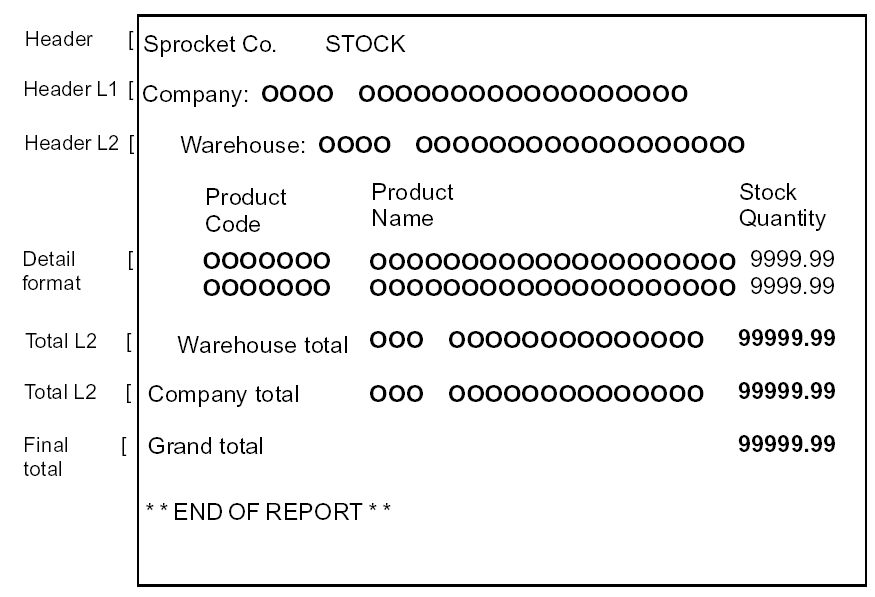
The following example shows a report device design made up of eight formats: