Modifying Device Designs › Editing Report Designs › Modifying Report Design Formats
Modifying Report Design Formats
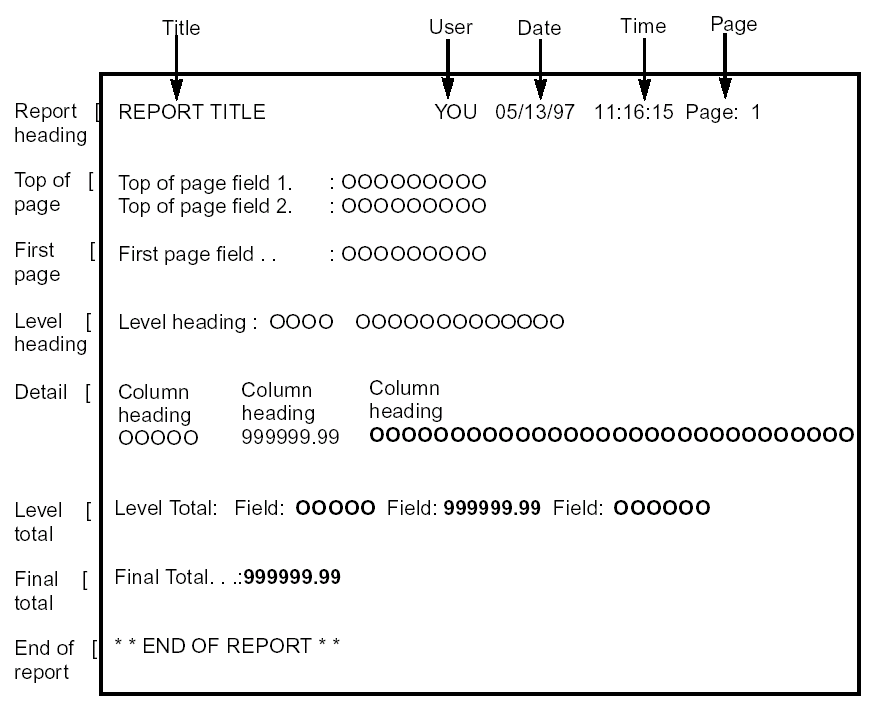
Report designs are made up of report design formats. When you first create a report by nominating an access path and a report function type, CA 2E automatically defines the appropriate formats for the report design. There are eight different report design formats. A typical report includes some or all of the following formats.
- The Report Heading Format—Includes the title, originator, and page information, defined by a Define Report Format (DFNRPTFMT) function. There is one Report Heading format per Print File function. This appears at the beginning of the report and on each page of the report. The information on this format is common to all report designs that share the same DFNRPTFMT function. This format cannot be dropped or hidden.
- The Top of Page Heading Forma—Includes the information to be repeated on each page. By default, this format is empty. There is one Top of Page Heading format per PRTFIL function. The information on this format is specific to the individual report. This format is not available for PRTOBJ.
- The First Page Heading Format—Includes the information to be printed before the first level heading or detail records for a given print function. By default, this format is empty. There is one First Page Heading format per report function (PRTOBJ or PRTFIL) only printed once per report function.
- The Level Heading Format—\-Contains fields appropriate to the key level. There is one key field per report function (PRTOBJ or PRTFIL). By default, this format is printed before the first detail or subheading within a level break. If the access path contains only one key field, this format is omitted.
- The Detail Format—Contains fields from the based-on access path. There is one Detail format per report function (PRTOBJ or PRTFIL). By default, this format is printed for every record read. This format cannot be dropped, only hidden.
- The Level Total Format—Contains fields appropriate to the key level. There is one level total format per level break per report function (PRTOBJ or PRTFIL). By default, this format is printed after the last detail record or subtotal within a level break. If the access path contains only one key field, this format is omitted.
- The Final Total Forma—Contains totals of previous total levels. By default, this format contains only the constant Final Totals; user fields must be added for totaling. By default, this format is printed after the last level total format.
- The End of Report Format (report footer) at the end of the report—Is defined by a Define Report Format (DFNRPTFMT) function type. There is one End of Report format per PRTFIL. This format is printed after all other formats in the report. This format is not available for PRTOBJ.
These format types are present on PRTFIL and PRTOBJ functions.
The following example shows the general appearance of a report design, including report design format types and page headings.
You use the Display Report Formats panel to view which formats are present in the report device design. This is where you determine the available formats, if they are printed, the positioning and overflow treatments, and zoom into the format details. To access the Display Report Formats panel, press F17 from the report device design.

