

|
|
|
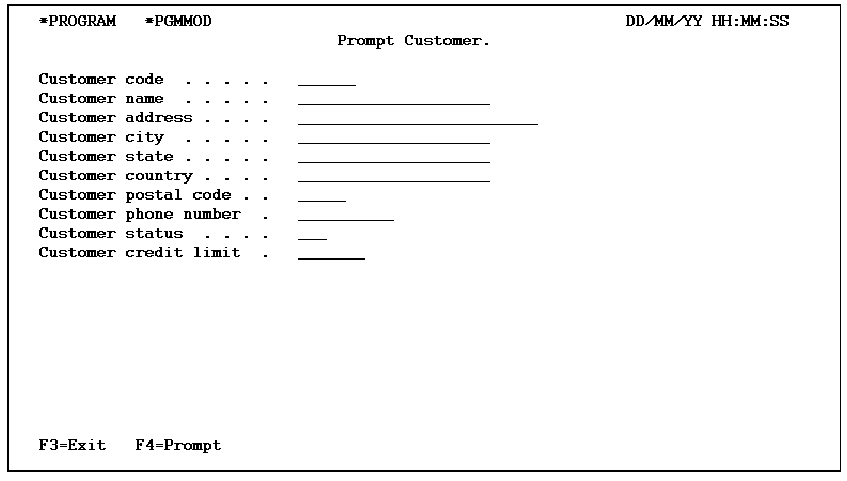
PThe Prompt Record (PMTRCD) function defines a program to prompt for a list of fields defined by a specified access path. You can pass the validated fields as parameters to any other function whether it is interactive, batch, a user-defined function to print a report, or an i OS message function such as Execute Message.
There is no default action for this function type. If you want to call another function once you validate the PMTRCD fields, you must specify this in the action diagram.
The fields that appear, by default, on PMTRCD are based on the file/access path over which the function is built. You can drop all panel format relations and fields and use your own function fields and subsequent validation on the function as an alternative to validating fields with file relations.
You can attach a PMTRCD function to a Retrieval (RTV) or a Resequence (RSQ) access path. There is no update processing for this function unless you specifically include it in the action diagram. A Prompt Record function does not validate the existence of a particular record from the underlying access path. It will, however, validate panel level relations and date and time fields.
The PMTRCD function executes in *ENTER mode only and there is only one display panel for this function.
The following table shows the parameters available.
|
Parameters |
Usage |
Role |
Default |
Option |
|---|---|---|---|---|
|
Return code |
B |
– |
Y |
R |
|
Fields from access path |
Any |
-/MAP |
- |
O |
|
Any other fields |
Any |
-/MAP |
- |
O |
The following table shows the function options.
|
Options |
Default Value |
Other Values |
|---|---|---|
|
Repeat prompt |
N |
Y |
|
Confirm prompt |
Y |
N |
|
Confirm initial value |
M(YCNFVAL) |
Y, N |
|
Send all error messages |
M(YSNDMSG) |
Y, N |
|
If action bar, what type? |
M(YABRNPT) |
A, D |
|
Commit control |
N(*NONE) |
M(*MASTER), S(*SLAVE) |
|
Generate error routine |
M(YERRRTN) |
Y, N |
|
Reclaim resources |
N |
Y |
|
Closedown program |
Y |
N |
|
Copy back messages |
M(YCPYMSG) |
Y, N |
|
Generation mode |
A |
D, S, M |
|
Screen text constants |
M(YPMTGEN) |
L, I |
|
Generate help |
M(YGENHLP) |
Y, N, 0 |
|
Help type for NPT |
M(YNPTHLP) |
T, U |
|
Workstation implementation |
M(YWSNGEN) |
N(NPT), G(GUI), J(JAVA), V(VB) |
|
Distribute a file I/O Control |
M(YDSTFIO) |
S, U, N |
For more information on function options, see the chapter, "Setting Default Options for Your Functions."
The following is an example of Prompt and Record panel.
For more information on user points, see the chapter, "Modifying Action Diagrams."
| Copyright © 2011 CA. All rights reserved. | Tell Technical Publications how we can improve this information |