Defining Functions › Function Types, Message Types, and Function Fields › PRTFIL Device Function › Parameter Considerations
Parameter Considerations
Effect of restrictor parameters:
- If you furnish all the keys of the access path to which a PRTFIL function attaches as restrictor parameters to the function, only the record with the given key or keys prints.
- If you furnish only some of the keys (such as the major keys) as restrictor parameters, all of the records with the given key print.
- If you furnish none of the keys of the access path as restrictor parameters, all of the records on the access path print.
Effect of positioner parameters:
- If you furnish all of the keys of the access path to which a PRTFIL function attaches as positioner parameters to the function, only the records with a key value greater than or equal to the given key or keys print.
- If you furnish only some of the keys (such as the major keys) as restrictor parameters, but some or all of the remaining keys are passed as positioner values, only those records with keys equal to the restrictor values and greater than or equal to the positioner values print.
- If none of the keys of the access path are supplied as positioner parameters, all of the records in the access path within the specified restrictor group print.
Level breaks:
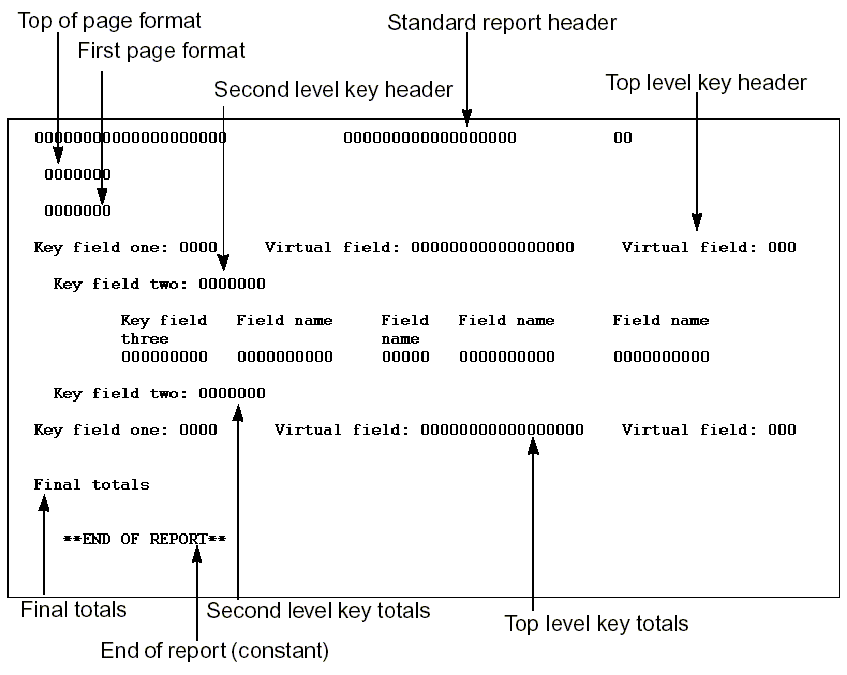
- CA 2E defines a level break whenever a major key value changes.
- On a level break, the Print File resets the fields in the associated controlling Header format and its associated Total format. The fields are reset to blank, zero, or values from the DB1 context as appropriate. The total number of formats for the PRTOBJs and PRTFILs cannot exceed 104 if generated in RPG and 96 if generated in COBOL.
- You can remove a level break and the associated processing by dropping the associated header and total formats. Totals automatically accumulate at the higher levels.
- If you hide the formats, the processing remains in the execution but the output is suppressed from the report.
- You can add a maximum of 24 PRTOBJ functions to one PRTFIL function.
The following table shows the parameters available.
|
Parameters
|
Usage
|
Role
|
Default
|
Option
|
|
Return code
|
B
|
–
|
Y
|
R
|
|
Key fields
|
I
|
RST/POS
|
-
|
O
|
|
Other fields
|
Any
|
/MAP
|
-
|
O
|
The following table shows the function options available.
|
Options
|
Default Value
|
Other Values
|
|
Send all error messages
|
M(YSNDMSG)
|
Y, N
|
|
Commit control
|
N(*NONE)
|
M(*MASTER), S(*SLAVE)
|
|
Generate error routine
|
M(YERRRTN)
|
Y, N
|
|
Reclaim resources
|
N
|
Y
|
|
Closedown program
|
Y
|
N
|
|
Copy back messages
|
M(YCPYMSG)
|
Y, N
|
|
Generation mode
|
A
|
D, S, M
|
|
Screen text constants
|
M(YPMTGEN)
|
L, I
|
|
Overrides if submitted job
|
*
|
N
|
|
Distributed file I/O ControL
|
M(YDSTFIO)
|
S, U, N
|
For more information on function options, see the chapter, "Setting Default Option for Your Functions."
The following is an example of a Print File.
For more information on user points, see the chapter, "Modifying Action Diagrams."

