

|
|
|
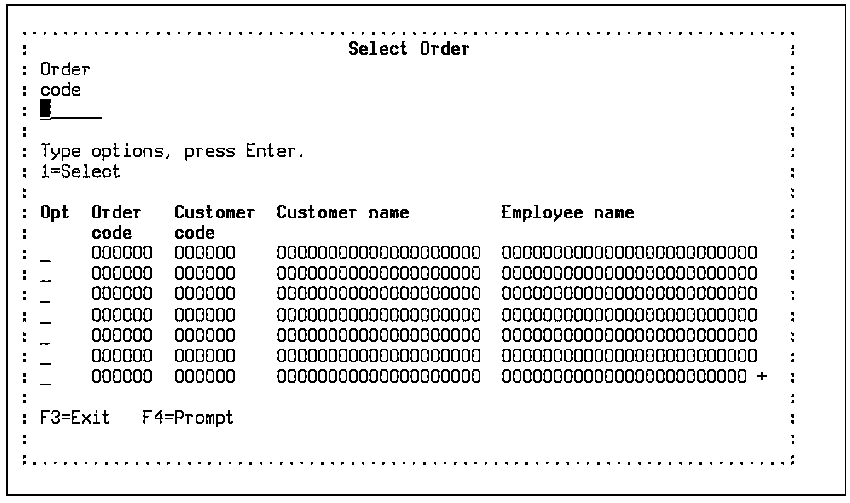
The Select Record (SELRCD) function defines a program to display the records from a specified file using a subfile. The program enables the end user to select one of the records and the key of the selected record is returned to the calling program.
For each field on the based-on access path, an associated input-capable field is present on the subfile control record. You can use these fields to control how records from the database are displayed. There are three types:
The SELRCD function type differs from the Display File function type. Records are similarly displayed as a list or subfile, but the SELRCD function includes processing to return the key values to the panel of the calling function whenever you select an item with a line selection option of 1 (CUA Entry) or / (CUA Text) action bar.
You can attach a SELRCD function to a Retrieval (RTV), Resequence (RSQ), or Query (QRY) access path. The QRY access path lets you specify virtuals as key fields.
Effect of parameters:
If you define a partially restricted key to a SELRCD function, the SELRCD function displays a subset of the total number of records. If you do not restrict the keys, you can use them to position the subfile display. To do this, enter the character string required to position the display after the ? in the relevant code field.
Design considerations:
The SELRCD function executes in *SELECT mode only. There is only one display panel for this function type. There is no default update processing for this function.
When you type a ? or user prompt (F4) for a key or foreign key field, CA 2E calls the prompt function assigned to this file-to-file relation. The SELRCD function based on the access path used to validate the value entered becomes the default prompt function.
CA 2E determines the appropriate default prompt function to call for a key or foreign key field as follows:
The F4 prompt function assignment enables you to select another function to override the function assigned to the access path relationship. This assignment can be made at the access path or function level. You can select any external function except Print File and the function can be based over any access path that is valid for the function type you select. Function level assignments take precedence over access path level assignments.
For more information on instructions for assigning F4 prompt functions, see Editing Device Designs and Building Access Paths in the chapter "Modifying Device Designs," and Changing a Referenced Access Path in the chapter "Modifying Access Paths."
The following table shows the parameters available.
|
Parameters |
Usage |
Role |
Default |
Option |
|---|---|---|---|---|
|
Return code |
B |
– |
Y |
R |
|
Key fields |
B |
MAP |
Y |
R |
|
Other fields |
B |
RST |
– |
O |
|
non-key fields |
I |
MAP |
– |
O |
|
Other fields |
Any |
-/MAP |
– |
O |
If there are output or both parameters, these are passed back automatically if the fields are present in the subfile record.
The following table shows the function options available.
|
Options |
Default Value |
Other Values |
|---|---|---|
|
Subfile end |
M(YSFLEND) |
P, T |
|
Send all error messages |
M(YSNDMSG) |
Y, N |
|
If action bar, what type? |
M(YABRNPT) |
A, D |
|
Commit control |
N(*NONE) |
M(*MASTER), S(*SLAVE) |
|
Generate error routine |
M(YERRRTN) |
Y, N |
|
Reclaim resources |
N |
Y |
|
Closedown program |
Y |
N |
|
Copy back messages |
M(YCPYMSG) |
Y, N |
|
Generation mode |
A |
D, S, M |
|
Screen text constants |
M(YPMTGEN) |
L, I |
|
Generate help |
M(YGENHLP) |
Y, N, O |
|
Help type for NPT |
M(YNPTHLP) |
T, U |
|
Workstation implementation |
M(YWSNGEN) |
N(NPT), G(GUI), J(JAVA), V(VB) |
|
Distributed file I/O Control |
M(YDSTFIO) |
S, U, N |
For more information on function options, see the chapter, "Setting Default Options for Your Functions."
The following is an example of a SELRCD.
For more information on user points, see the chapter "Modifying Action Diagrams."
| Copyright © 2011 CA. All rights reserved. | Tell Technical Publications how we can improve this information |